
Payment links
Collect money that has no order behind it: a deposit for a party, an advance for a booking, or a balance. Muncho sends the guest a link on WhatsApp and the money goes to your bank like any other payment.
You will need: Razorpay connected, and the guest’s mobile number.
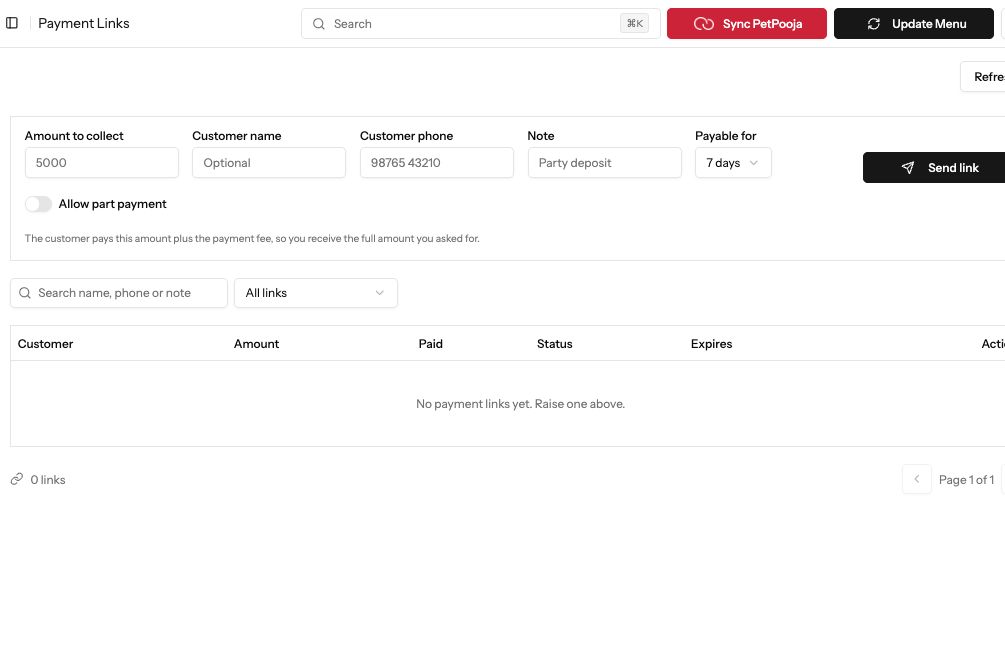
Demonstration data. Review the amount, customer details, expiry and part-payment setting before sending a link.
1. Fill in the link
Section titled “1. Fill in the link”Under Payments in the sidebar, open Payment Links. Fill in:
- Amount to collect: what you want to receive.
- Customer name: optional.
- Customer phone: the guest’s 10-digit mobile number.
- Note: what it is for, for example “Party deposit”.
- Payable for: how long the link stays open, from 1 day to 30 days.
The guest pays this amount plus the payment fee, so you receive the full amount you asked for.
2. Let the guest pay in parts (optional)
Section titled “2. Let the guest pay in parts (optional)”Turn on Allow part payment if the guest can pay in instalments. Set a Minimum first payment if you want one. Reminders then ask only for what is left.
3. Send it
Section titled “3. Send it”Press Send link. Muncho sends the link to the guest on WhatsApp and the page says Payment link sent on WhatsApp.
4. Follow it up
Section titled “4. Follow it up”Every link is in the list below the form. Filter by Awaiting payment, Paid, Expired or Cancelled. On each row you can:
- Copy link, or Share on WhatsApp yourself from your own phone.
- Send again from the restaurant’s WhatsApp.
- Cancel this link if the guest no longer needs to pay.
Paid links also show under Payment History, on the Payment Links tab.
Common failures
Section titled “Common failures”It says "Enter the customer's 10-digit mobile number"
The phone number is missing or not a full Indian mobile number. Type the 10 digits and press Send link again.
It says "Link created, but WhatsApp did not deliver it. Share it yourself."
The link exists but the message did not reach the guest. Use Copy link or Share on WhatsApp yourself on that row.
Next steps
Section titled “Next steps”- Payment History: every payment, including paid links.
- Who pays the fees: the online payment fee.