
QR codes and tables
Every table gets its own QR code. A guest who scans it lands on your menu with the table already known, so their order and bill go to the right table.
You will need: Dine in open on your account, and your tables set up in your POS.
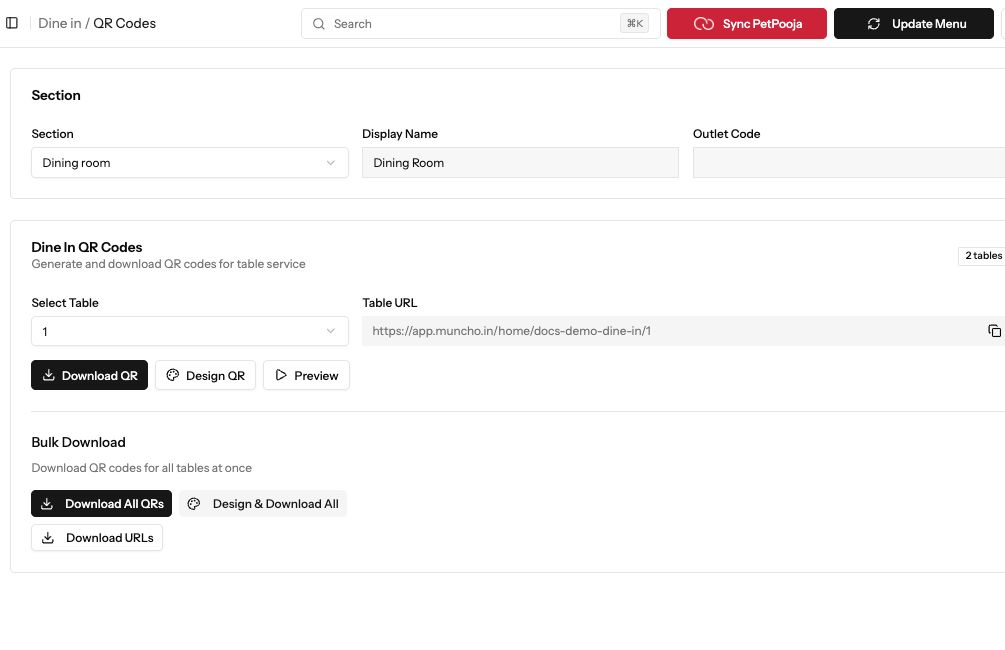
Demonstration data. Choose the section and table before downloading its QR code.
1. Open the QR page
Section titled “1. Open the QR page”Go to Dine in > QR Codes & Tables. If you have more than one dining area, pick it in Section. The page lists the tables in that section.
2. Download the QR code for one table
Section titled “2. Download the QR code for one table”Under Dine In QR Codes, pick the table in Select Table. The Table URL shows the link the code opens; press the copy button to copy it. Press Preview to see what the guest will see, then Download QR.
3. Change how the QR code looks
Section titled “3. Change how the QR code looks”Press Design QR to open the QR designer and change how your codes look before you print them.
4. Download every table at once
Section titled “4. Download every table at once”Under Bulk Download, press Download All QRs. Muncho builds a code for every table in the section and downloads them together. Print them and put one on each table.
If you also take pickup orders, the page has a Pickup QR Code card with Download Pickup QR and Download Delivery QR.
Common failures
Section titled “Common failures”The page says "No Tables Found"
The section has no tables yet. Tables come from your POS, so add them there first. If they still do not show here, message your Muncho account manager.
Download QR says "Please select a table first"
Pick a table in Select Table, then press Download QR again.
A QR code opens the wrong menu or the wrong table
Note which table and which section it is, and message your Muncho account manager. Do not reprint until we have checked the link.
Next steps
Section titled “Next steps”- Table ordering and paying from the phone: what guests can do after they scan.
- Sync your menu from your POS: bring new tables and dishes across.